APGAR Calc1.0
Publisher Description
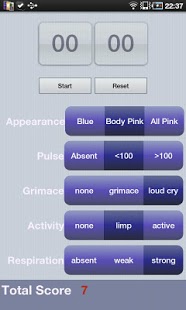
Designed by a pediatrician, APGAR calculates a newborn's APGAR score with great ease. Simply click on the descriptors and the program will tell you the score. Additionally, it has a built in timer that will flash red, buzz, and optionally emit an audible ring at 1 and 5 minutes to remind the user it is time to calculate an APGAR. The timer is optional. Apgar can be calculated at anytime while it is running or without using it all. Touch and audible reminders can be disabled in settings if desired. Reference articles are included.
Feature Summary:
-Simple way to calculate APGAR score
-Optional timer able to remind you to obtain score at proper times
What is an APGAR?
The Apgar score was devised in 1952 by Dr. Virginia Apgar as a simple and repeatable method to quickly and summarily assess the health of newborn children immediately after birth. It stands for "Appearance, Pulse, Grimace, Activity, Respiration."
******************************************
Intended for use by pediatricians, neonatologists, physicians, medical students, and pediatric nurses who are present at newborn deliveries.
APGAR Calc should be used only as a reference aid. The information contained in the app should not be used as a substitute for the exercise of professional clinical judgement. Please contact the developer if you find any errors.
Tags: APGAR, pediatrics, Medical student, Dr. Virginia Apgar, EMT, paramedic, newborn delivery, APGAR score
About APGAR Calc
The company that develops APGAR Calc is Jacob Beniflah. The latest version released by its developer is 1.0. This app was rated by 1 users of our site and has an average rating of 4.0.
To install APGAR Calc on your Android device, just click the green Continue To App button above to start the installation process. The app is listed on our website since 2011-10-24 and was downloaded 28 times. We have already checked if the download link is safe, however for your own protection we recommend that you scan the downloaded app with your antivirus. Your antivirus may detect the APGAR Calc as malware as malware if the download link to com.spiral.android.apgar is broken.
How to install APGAR Calc on your Android device:
- Click on the Continue To App button on our website. This will redirect you to Google Play.
- Once the APGAR Calc is shown in the Google Play listing of your Android device, you can start its download and installation. Tap on the Install button located below the search bar and to the right of the app icon.
- A pop-up window with the permissions required by APGAR Calc will be shown. Click on Accept to continue the process.
- APGAR Calc will be downloaded onto your device, displaying a progress. Once the download completes, the installation will start and you'll get a notification after the installation is finished.
Program Details
System requirements
Download information
Pricing
Version History
version 1.0
posted on 2011-10-24
Several fixes and updates
